Firefox
Journal Update
! Action Required: Please note that a new proxy configuration file is valid as of December 2, 2025
You have to use now the following address: https://journals.ecvs.org/proxy.pac
1. Find Preferences / Settings
For changing proxy settings in Firefox Browers please go to "Settings/Preferences", you'll find these under MacOS "Firefox" Menu, in Windows you'll find that top right under the "hamburger" icon  and "Options":
2. Find Proxy Settings
Once you have opened "Settings/Preferences/Options", you can search for the proxy settings typing in "proxy" in text field "find in options" top right". With that you should find a section called "Network Settings" and "Configure how Firefox connects to the Internet" and a button next right "Settings...". Click on this Button and a new dialog will open.
3. Configure Automatic Proxy Settings

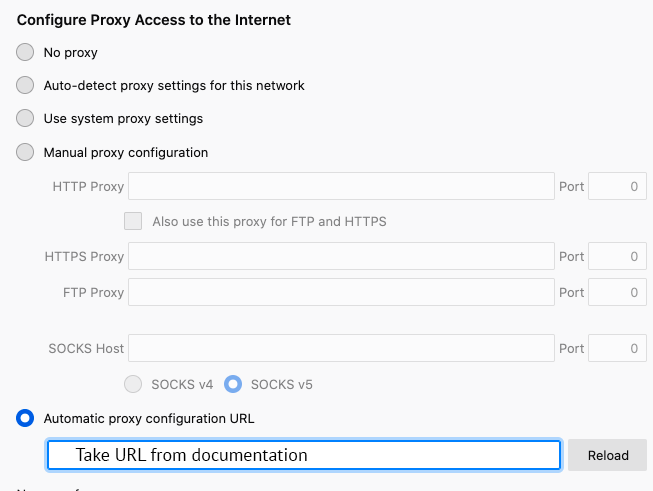
If the actual selection is any other than "no proxy: Please as mentioned in warning above please make sure you contact your local system administrator if you are not sure !
If the actual selection is "no proxy" it's fairly safe to change it to "Automatic proxy configuration URL" and in URL enter exaclty "https://journals.ecvs.org/proxy.pac" then press "Reload" button.
4. Done
You should be all set now: all traffic to the preselected publishers should go now thru us, any other website will not be affected!