Google Chrome
Journal Update
! Action Required: Please note that a new proxy configuration file is valid as of December 2, 2025
You have to use now the following address: https://journals.ecvs.org/proxy.pac
1. Find Proxy Preferences / Settings
Chrome allows configuration of proxy only on system level, that's why we recommend using Firefox!
Please go to Chrome Settings" - on MacOS you'lll find that under the "Chrome" menu and "preferences, under Windows top right under the three dots icon and "Settings", please type "proxy" into the search settings text field on top, you should get a search selection including "Open your computers'sproxy settings".
2. Go to System Proxy Settings

Please click on that, a system dialog will appear:
Windows - Configure Automatic Proxy Settings
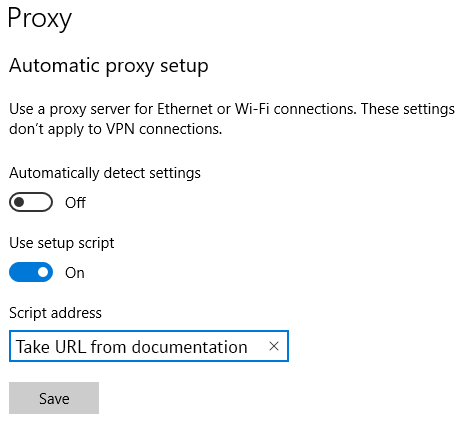
Please disable "automatically detects settings", enable "use setup script" and enter in the Script adress text field: "https://journals.ecvs.org/proxy.pac" then "save".
MacOS - Configure Automatic Proxy Settings
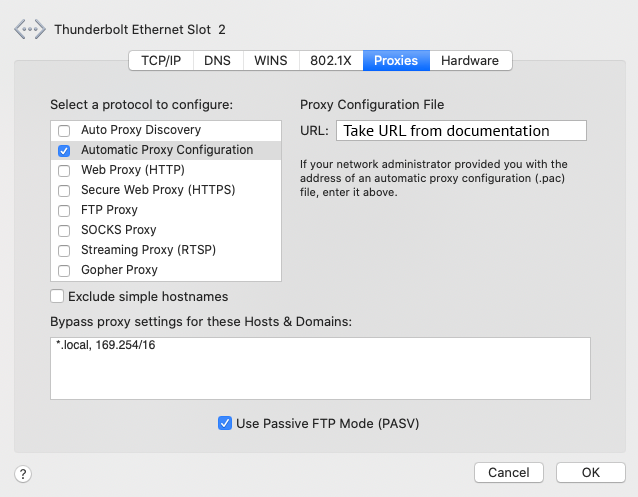
Please check "Automatically Proxy Configuration" and enter exatcly:"https://journals.ecvs.org/proxy.pac" into "Porxy Configuration File" text entry field, then "ok".
Please note: In MacOS (as well as in iOS, ipadOS), proxy configuration is per "Network", usually you should only have one on local PCs. On Mobile devices this is also per connected WLAN, which might make that quite uncomfortable. Also iOS devices do not allow proxy configuration for mobile internet access via 3G, LTE, 5G!